
SUPERSTATION
What is SUPERSTATION?
SUPERSTATION is a Global VarAC Game that is played over an extended time frame. Everyone in the world participates on an equal footing. We have release a new QSO Scorer DLL. Please download and follow instructions in README.txt in the ZIP file to install.
Superstation Downloads
Select the version that matches the architecture of your computer (64-bit or 32-bit). See the install video for instructions to determine your architecture. Please also download the QSO scorer update from 22 November. Installation instructions are in the README.txt file in the zip file.
|

|
|
| ⬇️ Download Superstation v0.1.7.4 (64-bit) | ⬇️ Download Superstation v0.1.7.4 (32-bit) | |
| ⬇️ Download QSO Scorer Nov 22 2025 Update (64-bit) 🆕 | ⬇️ Download QSO Scorer Nov 22 2025 Update (32-bit) 🆕 |
VarAC Launcher Configuration
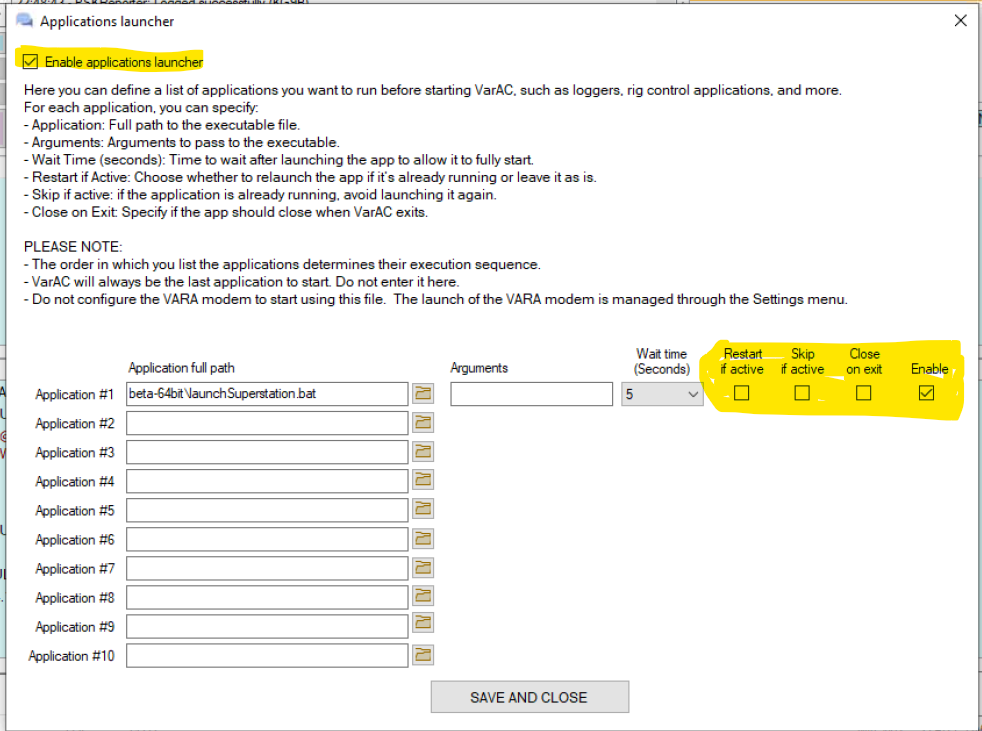
A bug exists in Superstation v0.1.7.4-beta when attempting to launch using the VarAC application launcher. Superstation is not finding the QSO scorer DLL. This will be fixed in the next release. The following is the work around to use until the next release.
VarAC can be configured to launch Superstation upon start-up. Create a batch file called superstationLauncher.bat in the same directory as the superstation executable. The contents of the batch file should be as follows (note: make sure name of executable matches the name of the executable to launch)
            cd %~dp0
            start superstation-0.1.7.4-beta.exe
In VarAC Settings menu select Application launcher. Browse to the path for where superstationLauncher.bat is locationed and select that file. Next, make sure you check "Enable Application Launcher". Finally, make sure you only select the "Enable" is the only check-box enabled on the row with the applicaiton. Click the "SAVE AND COMPLETE" button. Close VarAC and re-launch. Superstation should load in the background during the VarAC load process. See scren show below for the screen shot of settings.
SUPERSTATION - User guide
Our user guide provides an overview of the game, explains the scoring mechanics, includes directions for installing Superstation, and details how to use the
|
| ⬇️ Download Superstation User Guide (Dutch) |
| ⬇️ Download Superstation User Guide (English) |
| ⬇️ Download Superstation User Guide (German) |
| ⬇️ Download Superstation User Guide (Spanish) |
A special thank you to:
- Jürgen (OE6MNE) for the translation into German
- Pat (ON2AD) for the translation into Dutch.
- Ivan (KP3IV) for the translation into Spanish
SUPERSTATION - Win 10 & 11 install walk-thru
SUPERSTATION Game Four part series
We have just released a four-part video series that covers details of the Superstation game. Learn about why Superstation was created, goals of the game, game mechanics, and how the human-to-human QSO scorer works. Finally, the video has tips on how to maximize your score.
Contest Log Submission
The Superstation public beta is in the books. We are now accepting log files. Please watch the YouTube video below for detailed instructions. Log files must be sent by 0500 UTC on Thursday December 4th. Late log files will not be accepted. The log file name must match the required naming convention covered in the video, callsign.cbr, in order to be accepted. Callsign must be your callsign
SUPERSTATION - Bug reports
Please use our contact form to report any bugs. The list of known bugs as of Monday November 24, 03:45 UTC appears below.
- RESOLVED: A new QSO Scorer has been released. We received reports of Human-to-human QSOs being scored as human-to-machine. Mark and I anticipted as we have released as public beta. We have taken community input and example QSOs and a new QSO Scorer DLL was released on November 22, 2025. See the Downloads section at the top of this page for an updated DLL to upgrade your Superstation. The README.txt in the ZIP file has full instructions on how to upgrade.
- DISPLAY BUG - RESOLVE WITH RELOADING GAME: A contact must be greater than ten (10) minutes and human-to-human in order for it to be considered as a distance multiplier. If the duration is greather than 10 minutes and QSO is human-to-machine the distance is updating to the distance for the QSO. This is bug. SOLUTION: Re-load SUPERSTATION and it will properly rescore. The bug will be fixed in a future release.
- DISPLAY BUG - NO IMPACT TO GAMEPLAY: The available ROLL count resets to three after midnight (local time), but the user interface still shows zero. If the a ROLL occurs after midnight the display will show two two remaining which is correct. A future release will reset the ROLL remaining count on the user interface after midnight.
- SPELLING ERRORS - NO IMPACT TO GAMEPLAY: A couple of spelling errors have been reported in DEBUG log and start of game icons. As these do not impact game play these will be fixed in a future release.
- BUG WITH WORKAROUND - When Superstation is loaded using the VarAC application launcher it is not finding the QSO Scorer DLL. This is a bug and will be fixed in the next release. Please use this work around until the next release: superstationLauncher.bat work around
Goals of SUPERSATION
The purpose of the SUPERSTATION game is to increase the number of VarAC QSOs and to encourage more DX activity. A typical game will run over multiple weeks although a game can be run at any length. SUPERSTATION is different from any other amateur radio “contest.” There is an element of a card & dice game, promoting QSOs that are more than simple exchanges, and demonstrating the DX capabilities of the mode. All amateurs around the world are invited to participate. SUPERSTATION is integrated into VarAC via the VarAC.db file allowing SUPERSTATION to read information about contacts you've made. The game does not use beacons in any way. But we do use Broadcast. Check-out the walk-through videos above to see details how the Broadcast feature is used by SUPERSTATION.
Software Requirements
SUPERSTATION runs on a Windows 10 or 11 computer. SUPERSTATION runs as a single executable. You must have at least VarAC version 12.0.
Software Signing Key
SUPERSTATION beta software is digitially signed with K3JSJ's GNUPG key.
Private Beta Test Wrap-up
Thank you to the beta-test team! Your hard work and feedback helped us find and fix bugs. Your feedback also resulted in new features in SUPERSTATION. We are releasing SUPERSTATION version 0.7.1.4 as a beta release to the public on Monday, November 17th (0000UTC). 73, Mark KB0US Jason K3JSJ